Hermes is Nous Research's coding agent — CLI and GUI. It works with any OpenAI-compatible endpoint, so you can point it atBharatRouter and code with glm-5.3-flash, gpt-oss-120b, or any catalog model on one br- key — India-resident, metered, and budgeted. Here's the exact setup for both the CLI and the GUI.
🤖 Setting up with an AI agent? Point it at the machine-readable version — hermes-agent-bharatrouter.md — and it can configure Hermes for you. (Just paste the URL and your br- key.)
A drop-in for Codex or Claude Code
Hermes has the same shape you're used to — an agent in your terminal and a desktopGUI — so moving off Codex or Claude Code is a swap, not a re-learn. If your team lived in the Codex GUI, Hermes' GUI is the direct replacement; if you ran the Codex or Claude Code CLI, hermes is the terminal agent. Same workflow — now on open models (glm-5.3-flash, gpt-oss-120b) through BharatRouter: India-resident, one br- key, metered and budgeted.
You need
- A BharatRouter key (
br-...) — mint one in the console. - Hermes installed:
curl -fsSL https://hermes-agent.nousresearch.com/install.sh | bash
hermes setup
Install trouble? (Intel Mac, Apple Silicon, Homebrew)
The Hermes CLI installer is Nous Research's script, not ours — it pulls a git repo, a Python venv and Node, so it can fail for reasons that have nothing to do with BharatRouter. You don't need the Hermes CLI to use BharatRouter — the fastest fix is to use a path that just works (same models, same br- key, Intel + Apple Silicon):
- No install at all — sign in at /start, open Playground in the console, and chat in your browser.
- Claude Code (Node-based, cross-platform):
curl -fsSL https://bharatrouter.com/install/claude.sh | bash - Cursor — add BharatRouter as a custom OpenAI endpoint (base URL
https://api.bharatrouter.com/v1, your key, modelglm-5.3-flash). - Want the Hermes look? Use the Hermes desktop app (download) instead of the CLI, then add BharatRouter as a Custom Endpoint (see the GUI section below).
If you specifically want the Hermes CLI:
- Intel Mac + Homebrew warning (“we do not provide support for Intel x86_64”): it's usually just a warning — run
hermes --version; if it prints a version, ignore it. If it truly stopped, use a path above. - Apple Silicon (M1/M2/M3) install fails: the installer needs
git,python3and network access to clone the repo and build Python deps. Re-run it and read the stage that failed (“System prerequisites”, “Create Python virtual environment”, “Install Python dependencies”…). Share that exact line on buzz-help and we'll pinpoint it — meanwhile you're not blocked, use Playground or Claude Code above.
Point Hermes at BharatRouter (CLI)
The interactive way — hermes model walks you through it:
hermes model
# In the picker, choose "your own endpoint" (an OpenAI-compatible provider), then:
#   Base URL:  https://api.bharatrouter.com/v1
#   API key:   br-...        (your BharatRouter key)
#   Model:     glm-5.3-flash  (or gpt-oss-120b, or any catalog id)
Or set it non-interactively:
# Non-interactive equivalent — key to ~/.hermes/.env, the rest to ~/.hermes/config.yaml
hermes config set model.provider custom:api.bharatrouter.com
hermes config set model.base_url https://api.bharatrouter.com/v1
hermes config set model.model glm-5.3-flash
hermes config set BHARATROUTER_API_KEY br-...   # stored in ~/.hermes/.env
# confirm what landed:
hermes config get
Hermes keeps everything under ~/.hermes/ — your key in .env, the rest in config.yaml. A provider entry looks roughly like this (lethermes model / hermes config get be the source of truth for the exact keys your version uses):
# ~/.hermes/.env  — the key lives in env, never baked into config.yaml
BHARATROUTER_API_KEY=br-...

# ~/.hermes/config.yaml  — a custom OpenAI-compatible provider
model:
  provider: custom:api.bharatrouter.com
  base_url: https://api.bharatrouter.com/v1
  model: glm-5.3-flash                 # passed straight through as the OpenAI "model" field
  api_key: ${BHARATROUTER_API_KEY}     # env substitution — key stays out of the file
# the same base_url also works for Hermes' vision / approval / tts sub-configs
…or the GUI (Hermes app)
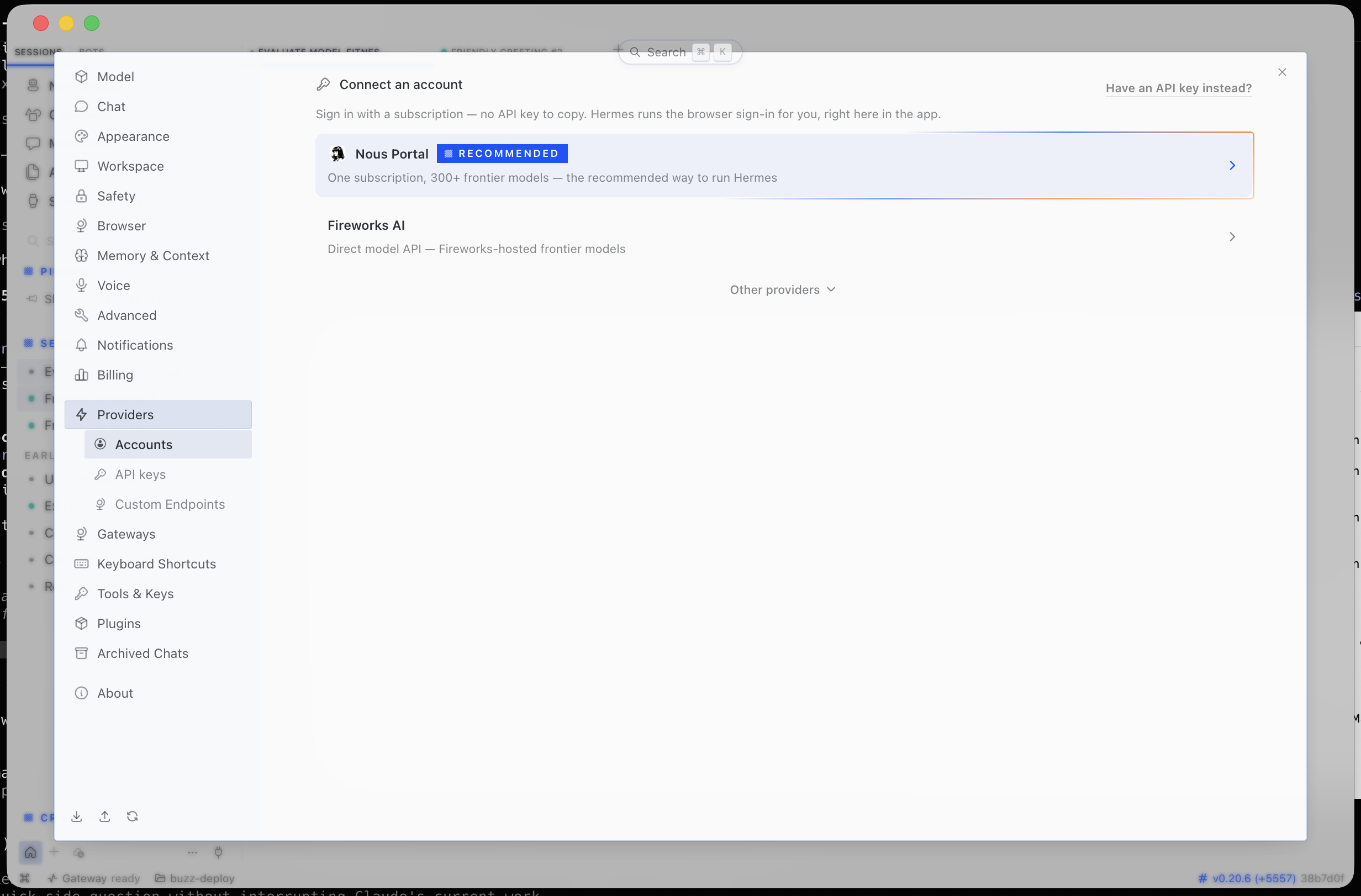
In the Hermes desktop app it's ~1 minute — but use the right screen. The step people miss: it's Providers → Custom Endpoints, not "Accounts" (Accounts is for subscription sign-in, and has no place for a base URL or key).
- Open Settings → in the left sidebar, Providers →Custom Endpoints → Add Endpoint.
- Fill in the fields:
- Name:
BharatRouter(any label) - Provider ID:
bharatrouter(any id) - Endpoint URL:
https://api.bharatrouter.com/v1 - API Key: your
br-…key - Default Model: type or pick
glm-5.3-flash(orgpt-oss-120b) — exactly, lowercase-hyphenated, not a display name
- Name:
- Tick Use for new chats and Discover models, thenTest → Save.
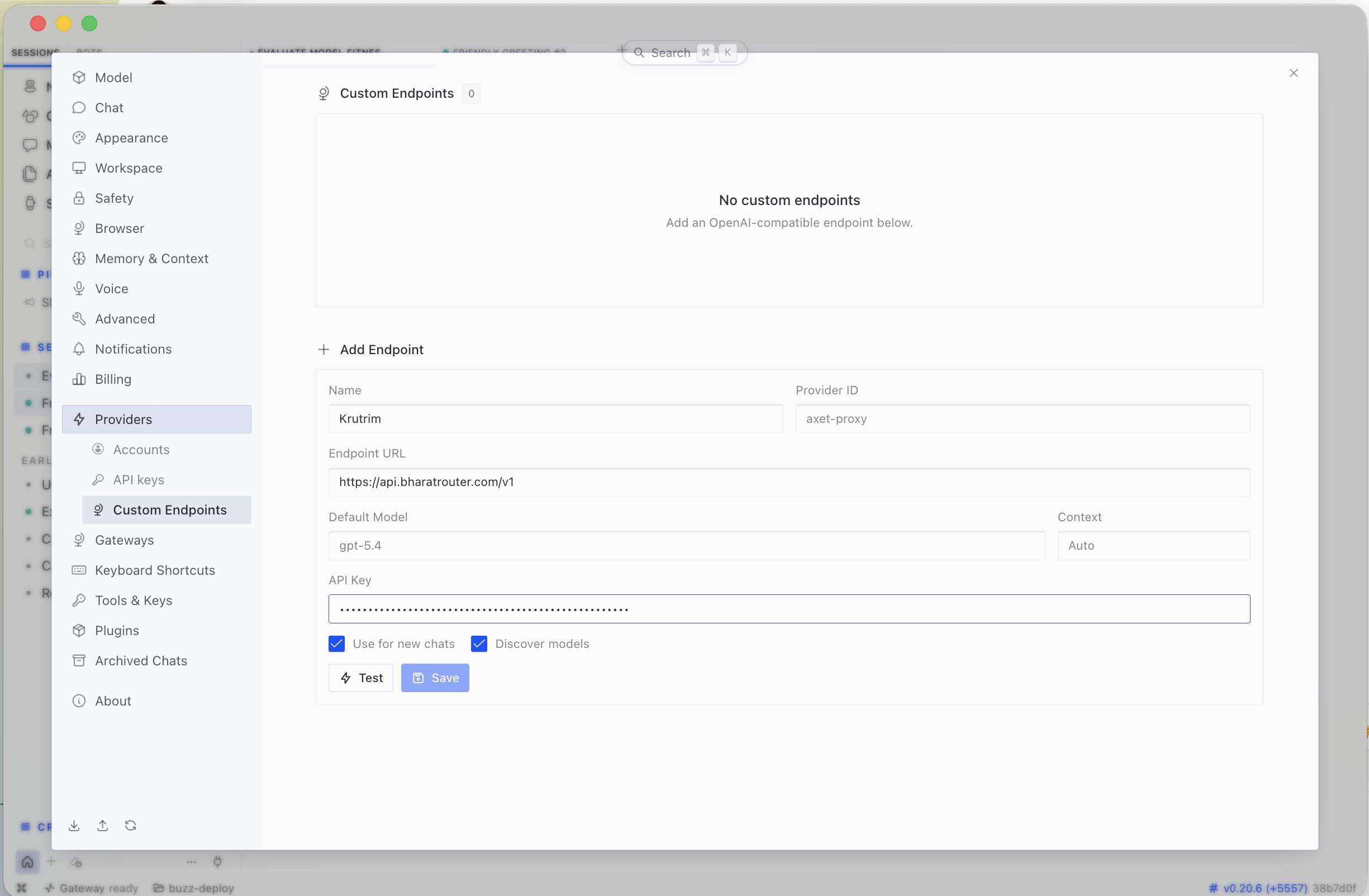
https://api.bharatrouter.com/v1, your br-… key, and a model id. Tick Discover models, then Test → Save.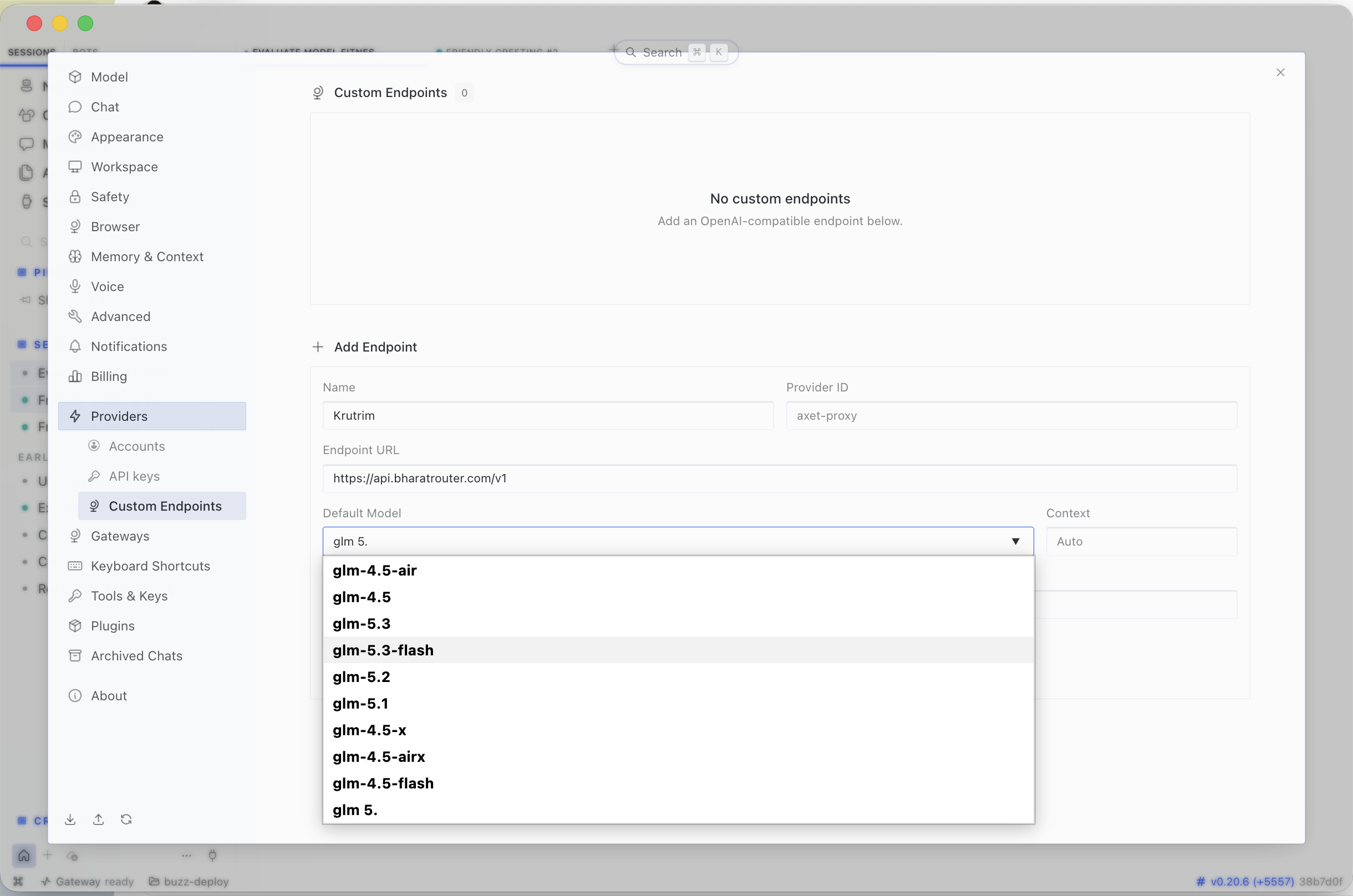
glm-5.3-flash (or gpt-oss-120b) exactly. If a cached list ever hides it, just type the id — it always works.The Discover models dropdown is fetched live from BharatRouter, soglm-5.3-flash appears there directly. If a cached list ever hides it, just type the id — it always works. The GUI and CLI share ~/.hermes/, so configuring either sets up both.
Run it
hermes                     # start the agent (CLI/TUI)
# or launch the Hermes GUI and pick the same provider/model from Settings
Both models do real tool-calling and streaming over BharatRouter, so Hermes' agent loop, file edits and tools work as normal. Switch models any time by changing the model value.
Good to know
- No silent fallback. If a model id isn't routed for you, BharatRouter returns a normal OpenAI-style
4xx— it fails fast rather than quietly serving a different model. Fix themodelvalue; don't assume a fallback. - Key stays in env. Reference it as
${BHARATROUTER_API_KEY}inconfig.yaml— never paste the rawbr-key into the file. - Timeouts: keep client timeouts generous — some models are slow to first token. No router-specific timeout quirks.
Which model
glm-5.3-flash— fast, 1M-token context; great for iteration and whole-repo prompts.gpt-oss-120b— heavier agentic coding and long tool-loops.
Background on both, and measured latency: GLM-5.3-Flash for coding agents.
Verify the endpoint
Independent of Hermes, a raw call confirms your key + model are live:
curl https://api.bharatrouter.com/v1/chat/completions \
  -H "Authorization: Bearer br-..." -H "Content-Type: application/json" \
  -d '{"model":"glm-5.3-flash","messages":[{"role":"user","content":"Say hello in one line."}]}'
Metered on your key — set ₹/token budgets per team or person in the console. "Hermes" is a Nous Research project; BharatRouter is not affiliated with it. Config-file keys can differ across Hermes versions — the interactive hermes model flow is authoritative.